In early April, Andrej Karpathy posted about using LLMs to build personal knowledge bases.
The pattern is pretty simple: put raw documents in one folder, have an LLM compile a markdown wiki from them, then ask the wiki questions instead of digging through the original material. In his case, the research wiki had 100 articles and roughly 400K words of LLM-generated content, and he rarely touched it directly.
Within days, implementations were everywhere. Karpathy shared a gist with the canonical pattern. Blog posts and forks started showing up all over the place. The three I sat with longest were a Medium writeup from someone who built two domain wikis in an hour with Claude Code, an academic-research fork of the pattern, and a more polished Go binary called sage-wiki.
I read a chunk of them, skimmed a pile of repos doing variations on the idea, sat with the pattern for a couple of days, and decided to try something different.
The choice I’m making
The Karpathy pattern rests on one premise. From his gist:
“The tedious part of maintaining a knowledge base is not reading or thinking. It’s the bookkeeping.”
There’s a lot of truth in that. Bookkeeping is friction: filing notes, linking related ideas, deciding what belongs where, noticing when a stub has become a real topic. I want help with that part. I just don’t want the system to assume it should generate the thinking for me.
That’s where I get cautious about the jump from “LLMs can handle the bookkeeping” to “the wiki becomes the LLM’s domain.” Some writing I want to do myself, because that’s where the thinking happens. Some writing I’m happy to have the AI draft, especially if the stakes are low or the structure is obvious. What matters is keeping that choice.
The two places I most want help are reducing capture friction and improving structural judgment.
By capture friction, I mean all the little steps between “I found something worth saving” and “this is now in the right place, with enough context that future-me can use it.” Reddit blocks automated tools that try to pull content. X paywalls everything. LinkedIn gates most content behind a login wall. Notes need to land somewhere useful, and getting there is more work than it looks.
By structural judgment, I mean the harder call after capture: where does this belong, what is it related to, and when has a recurring theme earned its own hub? Hubs need to emerge at the right time, not because I got excited after saving one article. That’s where the agent saves me real effort.
So the version I’m building keeps the agent near the friction points of the wiki, where the drag lives. Help me capture. Help me file. Help me notice structure. Draft when I ask. Stay out of the way when the writing is mine.
I don’t know yet if this approach will hold up. The vault is still young, and the way it feels right today might not survive a month of real use. But it’s a real choice with real costs on both sides. Plenty of people are getting value from the LLM-as-compiler approach. Mark Chen’s two-domain-wiki writeup is one I keep coming back to. He chose a more generated path, and from his account it works.
This isn’t a case against how anyone else builds theirs. It’s just the version I chose.
What I picked
I ended up using Tolaria, a desktop app for managing markdown knowledge bases. Tolaria is AGPL-3.0, built and maintained by Luca Rossi, the writer behind the Refactoring newsletter. He uses it for his own vault, which matters to me because tools built from real use usually have different instincts.
The app is a UI on top of plain files: notes with YAML frontmatter, wikilinks for connections, and saved views as YAML files in a views/ folder. The vault is grep-able, editable in any text editor, and survives any future tool migration because it’s just text and folders. The same vault works without Tolaria. The app is a viewer and editor, not a database.
I picked Tolaria for two specific reasons. First, the companion app gave me a useful interface without trapping the data. I could have built my own viewer against whatever folder structure I chose, and at some point I probably would have, but Tolaria already understood the conventions I wanted. Second, it’s git-native out of the gate. Obsidian never stuck with me. The git story was part of why. It has options, but the product wants to sell you on paid sync instead. Tolaria treats every vault as a git repo by default. I liked that, and the decision got easier.
The system grew with the agent
I started with one generic Bookmark type and nothing else. No hubs, no views, no conventions.
About ten saves in, recurring themes started showing up: tools I wanted to evaluate, AI industry news, blog-idea fodder, prompt templates worth trying.
In this setup, a hub is just a note for a recurring theme. It gives related material a shared home without turning the whole vault into a rigid taxonomy. Each hub appeared when the pattern earned it, not before.
The agent’s job here was watching the cluster, not naming it. tools-to-try was the first hub. ai-news came next. When a tool turned up that I’d already adopted in my daily setup, we promoted it into tools-i-use. Same shape as tools-to-try, different lifecycle position.
Other potential hubs got declined. I saved a Medium post on engineering management, a topic I obviously care about, and the agent’s call was:
If engineering-management becomes a recurring theme for you, the same hub-note + view pattern would apply, but with N=1 I wouldn’t create a hub yet.
That N=1 shorthand is just a compact way of saying, “one example might be a fluke.” I don’t want a new hub every time one article looks interesting. I want the structure to appear after a pattern starts earning its keep.
The same afternoon, it made the opposite call for a disciplined ChatGPT prompt I saved:
This is the first prompt artifact, but you’ve shown sustained interest in this space. I’d predict more prompt artifacts coming.
It created prompt-templates. Same heuristic, two opposite outcomes. That was the important part. The agent was weighing pattern density, not reflexively spawning structure.
The inbox almost became a junk drawer
The strongest moment of the experiment came from a near-miss. I had an Anthropic post I wanted to read soon and almost left it _organized: false to keep it in my inbox as a reminder. The agent pushed back:
The inbox is going to fight you over time. The inbox is for “I haven’t decided where this goes.” If you also use it for “I want to act on this soon,” they bleed together, and as more notes pile up, “act soon” notes get camouflaged by genuinely-unfiled ones. The signal degrades exactly when you need it most.
Right. The inbox is for unfiled notes. Action discovery happens through saved views, not through inbox staleness.
That turned into a vault-level convention immediately:
The inbox, meaning notes lacking
_organized: true, is for “I haven’t decided where this goes yet.” Action discovery happens through saved views inviews/*.yml. Don’t conflate the two.
That one rule probably saved the system from becoming useless.
Capture friction is real work
A lot of the content I want to save lives behind some kind of fetcher block. Reddit returns 429s to anonymous fetchers with empty user agents. X requires API access. LinkedIn gates most content beyond public previews. Each time we hit a wall, we solved it once and codified the workaround.
The bookmark flow is the part that feels like a read-it-later app rebuilt for agents. If you ever used Pocket, the shape will feel familiar, except the saved link does not just sit there waiting for you to come back. I send the agent a URL, and it does the boring first pass: fetches what it can, creates the bookmark, adds a short summary, captures the main sections, pulls out a few standout quotes to verify later, fills in author and published date when it can, and suggests relationships to existing hubs. If it looks like blog material, it adds a few angles I might riff on later. The note still stays unread until I personally read it, but it is no longer an inert URL sitting in a pile.
These started as one-off fixes in chat. The useful question became: where should each fix live? The agent’s framing was simple:
“Could a stranger using this vault on their own machine sensibly use this?” Put it in the vault instructions. “Does it only make sense with my exact account names, Keychain entries, or install paths?” Keep it in private memory.
On one hand, this vault is going to stay private and I won’t have any collaborators, so are we overthinking this? But still, it gave the agent a clean boundary: reusable behavior goes in the repo; private machine details stay out. So the Reddit workaround and the hub-creation rule became project instructions, and the local credentials stayed private.
The conventions are load-bearing
Some of the best rules came from corrections, not design. At one point, the agent marked a paywalled Pragmatic Engineer post as read because it had enriched the bookmark with the article body. I corrected it. I hadn’t personally read the source yet.
That became a rule:
The
statusfield tracks whether I have personally read the source. It does not track whether the agent enriched the bookmark.
A second brain is only useful if the metadata means what you think it means. If read starts meaning “an agent fetched it,” the system eventually lies to you. For this to work for me, the agent must treat my conventions as load-bearing. It doesn’t toggle Tolaria-managed state on its own. It doesn’t create hubs without asking. When I asked it to track a personal savings goal in a git-tracked vault, it flagged that the file would live in repo history forever and laid out options before touching anything. Without that posture, the system would drift into something I couldn’t trust.
Rules that have held up
If you’re building your own version of this, these are the rules that have held up best:
- Default to two examples before creating a hub. One example might be a fluke; two starts to look like a pattern.
- The inbox is for unfiled notes only. Action discovery happens through saved views.
statusreflects whether you personally read the source, not whether an agent enriched it.- Ask before structural moves: hub creation, file deletion, schema changes.
- Codify durable patterns into repo instructions. Keep machine-specific details in private memory.
That can sound abstract until the structure has to survive real use. Right now, the vault has 239 notes, 5 note types in active use, 9 saved views, and 6 hubs. The inbox is 96.7% organized. There are no dangling wikilinks, and related_to is consistent across 228 uses. The type distribution is also surprisingly even: Notes at 27%, Bookmarks at 26%, Questions at 22%, and Concepts at 20%. Nothing looks abandoned yet.

That matters because this is where personal knowledge systems usually start to rot. The structure gets exciting for a week, then the inbox turns into a junk drawer, tags multiply, and half the metadata stops meaning anything. So far, at least, the conventions are doing their job.
Plain text made customization boring
The whole vault is plain text, so customization is mostly a matter of deciding what to write down. Frontmatter is just YAML. Add a field, and the agent can read it. Future views can filter on it. Tolaria rendered custom fields as first-class properties in the sidebar without me doing anything special.
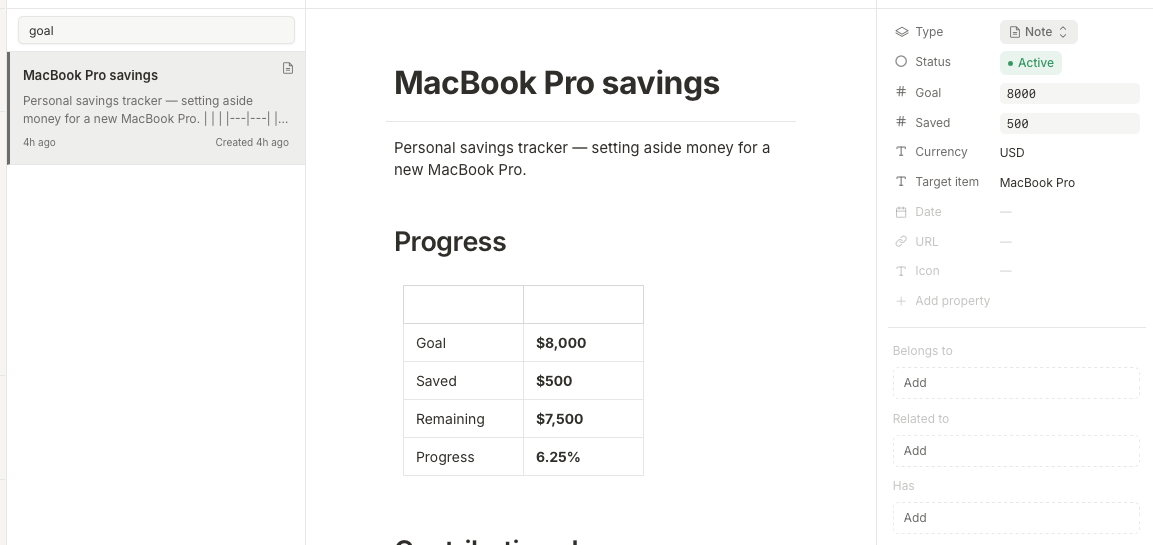
A note can sit in multiple hubs at once. A bookmark can be linked to both tools-to-try and blog-ideas by listing both in related_to. It shows up in both saved views without being duplicated. That was the moment I realized tags and categories are the wrong primitives for this system. The right primitive is “what is this related to,” which is just a list.
Lifecycle is whatever I write down. status: unread to read to archived for bookmarks. tried: false to tried: true plus a verdict for prompt templates. Nothing enforces these conventions except the notes themselves, but that has been enough because I’m the one running the system.
Views are filters, not folders. The same note appears in multiple views. Nothing has to be moved to appear in a new context. This is the design decision that killed the urge to over-organize.
What I found when I looked inside
A few days in, I asked what else Tolaria could do besides edit files. I expected to find some kind of search index, because tools that maintain indexes usually need a way to recover when the index falls out of sync.
There isn’t one. Search is a naive case-insensitive substring scan over every Markdown file on each call. There is no real index and no semantic ranking. At 50 notes it’s invisibly fast. At 50,000 it would likely crawl. That’s a real ceiling, but it does not threaten the vault itself because there is no proprietary state. The notes are still just files.
If I outgrow the in-app search, the specific replacement matters less than the job it does. ripgrep could give the agent very fast text search across a folder. SQLite FTS5, a module built into the SQLite database, could add full-text search without any extra server to run. Obsidian or Logseq are different escape hatches: not search engines, but alternate editing and navigation layers that can sit on the same files without a migration.
Tolaria also bundles a limited MCP server inside the desktop app. It can search, read, orient the agent, open a note in the running UI, highlight an element, but it does not write. The agent’s authoring path is the same as a human’s: edit a file on disk and let Tolaria notice the change.
That is the test for this kind of tool: when one feature of the host falls behind, can you route around it without migrating data? If you can, the system stays flexible. If you’re trapped, the substrate made too many decisions for you.
The hard parts are still hard
This setup is working, but it still has rough edges. The line between “this deserves a hub” and “this is a one-off” is genuinely hard when I only have one example. I’ve made the call both ways in the same session and won’t know which was right for months.
Multi-related_to is great for discoverability and bad for navigation overload. A note in five views shows up in five contexts, which can be useful or noisy depending on what I’m trying to find. I haven’t fully resolved this, and I expect the agent to keep evolving the relationships as we use the system more. Finding over-linked notes is exactly the kind of tending I want it doing.
What I think this is really about
I started this experiment thinking I was just choosing a note/memory system and app. I don’t think that’s the interesting part anymore. The interesting part is the substrate: plain text, git, clear conventions, and an AI collaborator that respects the boundaries of the system.
That also changes where the collaborator can live. Claude Code’s Remote Control lets me drive a session running on my laptop from my phone, an iPad, or any browser. The local environment stays where it is. API access, MCP servers, and the vault itself stay on the laptop. Only the input surface changes. The same pattern extends to OpenClaw or another agent, as long as repo hygiene stays healthy: pull before changing, commit intentionally, push when done.
The LLM-wiki pattern says: let the model compile the knowledge base for you. The version I want is different: let the model handle the drag around getting material into the system and finding it again, while I keep authorship and judgment close to me.
Maybe that changes later. Maybe the vault gets big enough that I want the model doing more synthesis than I want today. Maybe I will need to split notes into two vaults with different purposes. But right now, the system feels useful because it bends to me instead of asking me to bend to it. This is the version of a second brain I actually want: not a giant generated wiki I occasionally query, but a plain-text working memory I can shape with an AI collaborator working with me.