
I’ve been running three or four coding agents at once for a few months now. Claude Code in one project, Codex in another, Pi chewing on a migration in a third. The agents were rarely the bottleneck. I was. I’d kick one off, tab away to check on a second, and lose the thread. One had finished ten minutes ago without my noticing, another had quietly stopped to ask me a permission question I never saw.
tmux is the obvious answer, and I’ve tried to make tmux stick more than once. It never did for me. Some of that is ergonomics. The bigger problem is that tmux has no idea what’s running inside its panes. An agent sitting in a tmux pane is just text scrolling past. tmux can’t tell you it’s blocked, and it can’t tell you it’s done. So I ended up doing the one thing the agents were supposed to save me from: watching.
Herdr is the first tool that fixed this for me. It’s a single Rust binary that turns the terminal you already use into an agent multiplexer. You get tmux-style tabs, panes, and sessions that survive a disconnect, plus the one thing tmux structurally can’t do: each agent’s real state, surfaced in a sidebar. I’m still early with it, and it’s pre-1.0, but it has already earned a permanent spot in my setup.
Herdr isn’t the only tool going after this problem. A few native ones have shown up lately, Supacode, Conductor, Cmux. I tried a couple. They didn’t stick, and that was probably more me than them. Herdr did.
One honest catch up front. The value doesn’t come from the one-line install. It comes from two steps most people skip.
The setup that actually matters
Installing the binary is one line. I used Homebrew:
brew install herdr(There’s also a curl installer, mise use -g herdr, and a Nix flake if you’d rather.) That gets you a solid terminal multiplexer with good mouse support. It’s not yet the thing that changes how you work. Two more steps do that.
First, install the integration for each agent you run:
herdr integration install claudeSame pattern for codex, pi, and the rest. Herdr will auto-detect an agent in a pane without this by reading the screen, but the integration gives it hook-based reporting instead, which is more reliable. herdr integration status shows what’s wired up.
Second, install the agent skill, globally:
npx skills add ogulcancelik/herdr --skill herdr -gThe -g installs it for every supported agent instead of just the current project, so every session you start knows how to talk to Herdr. This is the step that turns Herdr from a passive window manager into something your agents can operate. More on why that matters below.
Skip these two and you’ll wonder what the fuss is about. Do them and the tool clicks.
The daily loop
My projects are declarative now. I use a plugin called herdr-plus that lets me describe a workspace in a small TOML file: the working directory, and a list of tabs, each with a startup command. One tab opens Claude, one opens lazygit, one splits into a dev server and an asset watcher, one is just an empty shell. I fuzzy-pick the project and the whole workspace spins up in a keypress, every command already running. When Herdr creates a git worktree, herdr-plus can lay the same layout into it automatically. That alone removed most of my morning setup friction.
Then the sidebar does the rest. Every agent shows one of a few states: idle, working, blocked, or done. When one finishes, I get a system notification and a sound. When one goes blocked, that means it’s waiting on a permission. I click in, grant it or flip that pane to auto-mode so it stops asking, and move on. I’m no longer polling four panes to see who needs me. Herdr tells me.
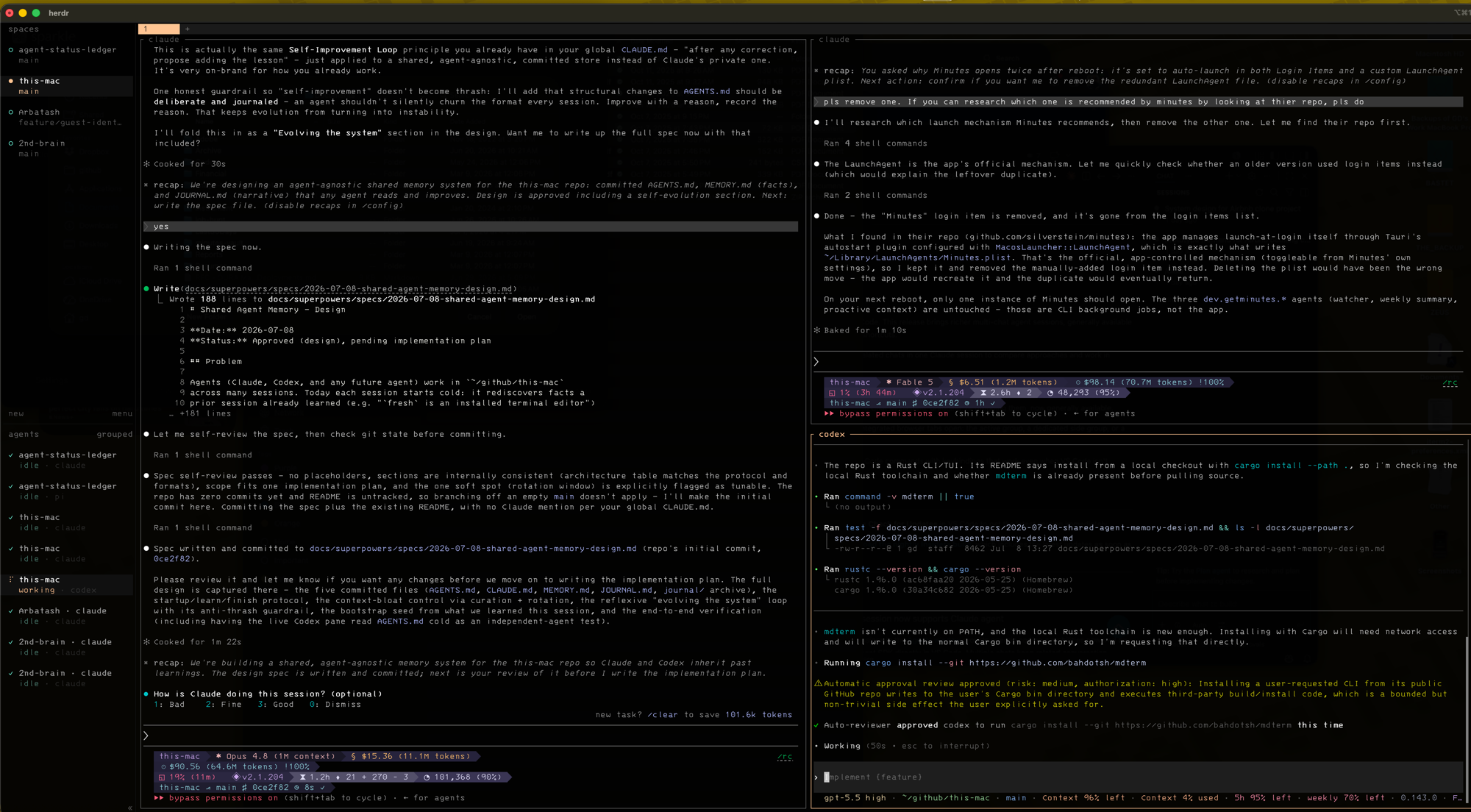
My actual setup: four projects in the left rail, the agents grouped under it, each tagged with its state and model. Codex is mid-task on this-mac while everything else sits idle, waiting on me. That state column is what tmux can’t give you.
Sessions sit above all of this. There’s a default session, and I can spin up a named one (say, work) that holds an entirely separate set of workspaces. Detach, close the window, reboot the laptop, and typing herdr brings the whole thing back. The agents resume into their previous conversations. I’ll come back to what does and doesn’t survive, because the honest version has an asterisk.
The part I didn’t expect: agents driving Herdr
This is the piece that made me sit up, and it’s what that global agent skill unlocks. Herdr exposes a control socket, and the skill documents it. So an agent inside a pane can drive Herdr itself, in plain language.
Two examples of what that looks like in practice.
Pi doesn’t have sub-agents natively. But with the skill loaded, I can tell Pi to spin up two Herdr panes, put a Pi agent in each, and have one build a prototype from our latest spec while the other runs the project’s test suite. When each one finishes, the lead Pi reads both panes and gives me a single summary of what the prototype produced and how the tests came out. It grafted sub-agent orchestration onto an agent that doesn’t ship with it.
Same shape with Claude. Here’s the prompt I use:
Open two Herdr panes. In one pane, give me an update on where we’re at with the project. In the other pane, do a code review on our latest changes. When both of those tasks are done, report back here summarizing both agents’ work.
Claude opens the two panes, runs each task, waits for both to finish, and reports a combined summary back in the pane I asked from. The multiplexer stops being a container I manage and becomes a tool the agent can call.
I watched Codex do exactly this. It installed a small tool, opened it in a fresh pane to render a doc, then ran herdr pane read to check the pane showed what it expected.
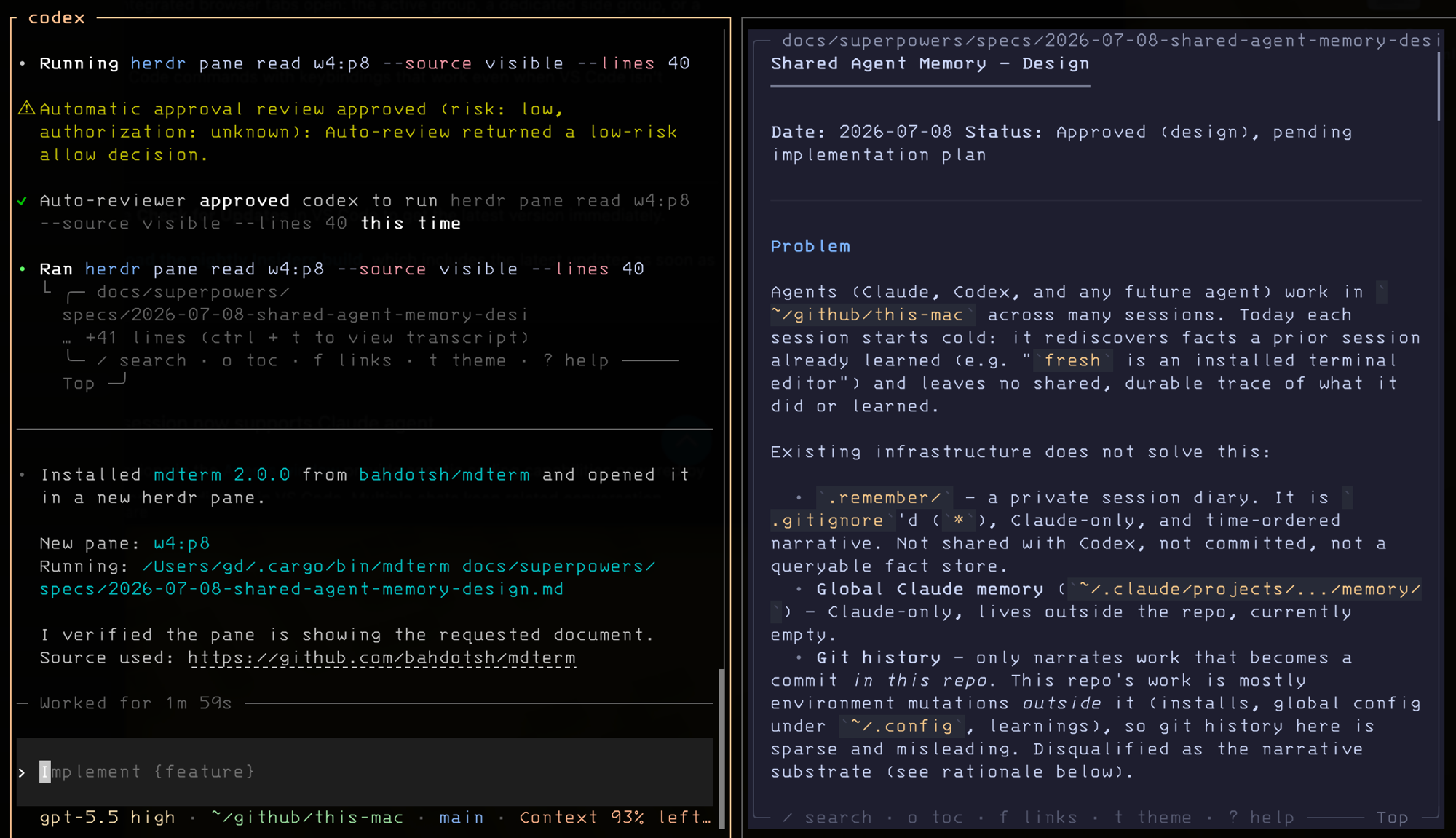
Codex driving Herdr from inside a pane: it installed mdterm, opened it in a new pane (w4:p8) to render a spec, then ran herdr pane read w4:p8 to confirm its own work landed. That read command is the agent operating the multiplexer over the socket API.
Herdr’s own blog has a line about coding agents becoming runtimes. This is the concrete version of that. It’s also the strongest single reason I’d reach for Herdr over a hand-rolled tmux config.
The endgame is remote
I’ve wanted this setup for a while: a beefier machine as the place the work happens, the laptop as a thin client.
Herdr is a server plus a thin client talking over a Unix socket. The client sends keystrokes; the server owns the tabs, panes, and persistence. Because it’s one binary, I can SSH into a Linux box and install it exactly the way I installed it on the Mac, and it’ll restore the session I left there. The catch with plain SSH is that the server uses the remote machine’s config, so my local keybindings don’t come along.
The fix is running Herdr with its remote flag, which SSHes for you. The server runs on the box, the client runs on my Mac, and the remote session keeps my local keybindings and bridges my clipboard while showing the remote machine’s files. Run the heavy agents on the box, drive them from the laptop with my own ergonomics, and it stops mattering whether the lid is open. That’s the setup I’m working toward.
The parts I don’t love
I don’t want to oversell this, so here’s the defense.
Windows support is early. The design leans on a Unix socket and a terminal PTY, so it grew up as a macOS and Linux tool. That doesn’t lock Windows users out: WSL2 has a real Linux kernel, so the Linux build runs there the way tmux does, and there’s now a native Windows preview beta behind a PowerShell installer. I haven’t run either myself, so I can’t tell you how clean they feel yet. If you’re on Windows, that’s the part I’d test before committing.
“Persistent” needs an asterisk, and Herdr is more honest about it than most. Detach or close the window and everything survives, because the server owns the processes. But stop the server or reboot, and the running processes stop with it. What comes back is a restore: your workspaces, tabs, and layout return, and supported agents relaunch into their previous conversations. Your dev servers and shell state do not. Agents come back. Running processes don’t. Worth knowing before you lean on it.
And it’s early. It’s pre-1.0, moving fast, and dual-licensed AGPL/commercial, which some shops steer clear of. I expect churn, and I’m fine with that for a tool I use directly rather than build on. Your tolerance may differ.
Everything I’ve described works today, on macOS and Linux, and it changed how I run parallel agents more than any tool I’ve tried this year. I’ll take the asterisks.