Stop screenshotting your agent’s work back at it. Point at the thing, say the thing, and it lands in the agent’s context as structure.
Your agent builds you an HTML plan, or maybe worse, a plan in markdown. If your review tool for it is a chat window, you don’t have a rendering problem. You have a feedback problem.
Here’s what that feedback loop looks like for most of us right now. The agent produces something visual. You screenshot it, paste the screenshot back into chat, and write a paragraph like “the third card down, the one with the pricing table, the middle column is wrong.” Then you wait to find out whether the agent understood which card, which column, and which kind of wrong. Half the time it edits the wrong thing and you write another paragraph. You’re playing telephone with a collaborator who can’t see where you’re pointing.
I’ve been living in a tool called Lavish for a bit over a week now, and it closes exactly that gap. This post is about how it works and where it earned a permanent spot in my setup.
The tagline is doing real work
Lavish’s pitch is “HTML is the new markdown,” and the line has a pedigree. Thariq, an engineer on the Claude Code team, kicked this off: “HTML is the new markdown. I’ve stopped writing markdown files for almost everything and switched to using Claude Code to generate HTML for me.” Karpathy backed it days later: “This works really well btw, at the end of your query ask your LLM to ‘structure your response as HTML’, then view the generated file in your browser.”
The logic holds up when you’ve watched an agent run for twenty minutes and hand you a plan. A long markdown plan is a wall. The same plan as HTML gets sections, tables, collapsible detail, and visual hierarchy that tells you where to look first.
But rich output was only ever half the problem. The other half is getting your reactions back into the agent. Even dictating your reactions doesn’t save you: on a long artifact it’s a lot to talk through, and typing it all is worse. That’s the half Kun Chen built. Days after Karpathy’s post, he shipped Lavish: a local CLI that opens agent-generated HTML in your browser, lets you click the exact element or highlight the exact sentence you have opinions about, type the opinion there, and queues it all back to the agent. It’s MIT-licensed, sitting at 2.2K stars, and by his own admission “built yesterday… not super battle-tested.” He wrote that in mid-May. A couple months of steady releases later, it feels sturdier than the quote suggests, though I did catch one papercut. More on that in a minute.
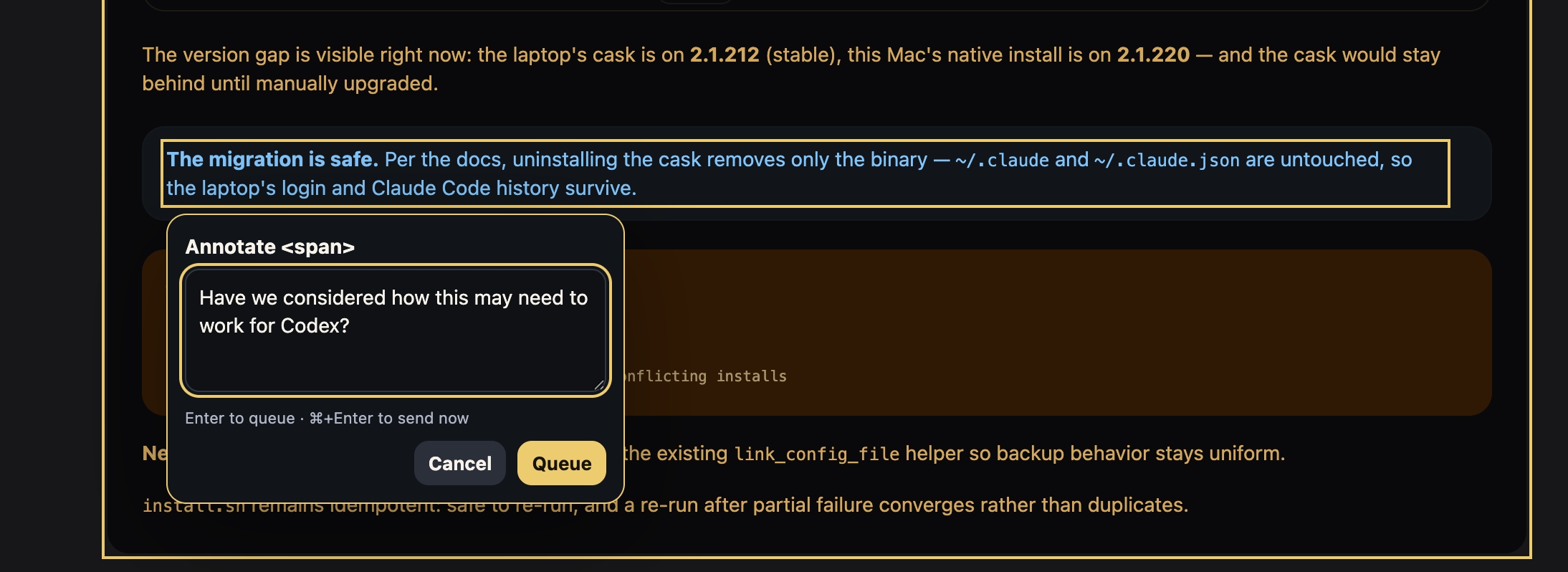
Here’s what that pointing looks like in practice: highlight a sentence in the artifact, and the annotation box opens right there.
One real session, wait and all
The session that sold me: I was curating a shortlist of eval tasks for a model comparison. The internet chatter said Kimi K3 was hanging with Fable, and I wanted to see for myself, which meant picking a set of tasks worth running them both on. The old way would be the agent printing a numbered list in the terminal and me typing “keep 1, 3, 7, cut 4, and 6 needs a tighter prompt.”
Instead the agent built a review page and opened it in my browser. That build is the first cost, and I want to name it where it happens: you ask, and then you wait while the agent authors a real HTML page. A couple of minutes, not seconds, and it scales with the work: the longer the artifact, and the more decisions the agent has to structure into it, the longer you wait. The wait is the agent writing HTML, not Lavish serving it. That distinction matters, because it means the cost is the price of the format, and no Lavish release is going to patch it away.
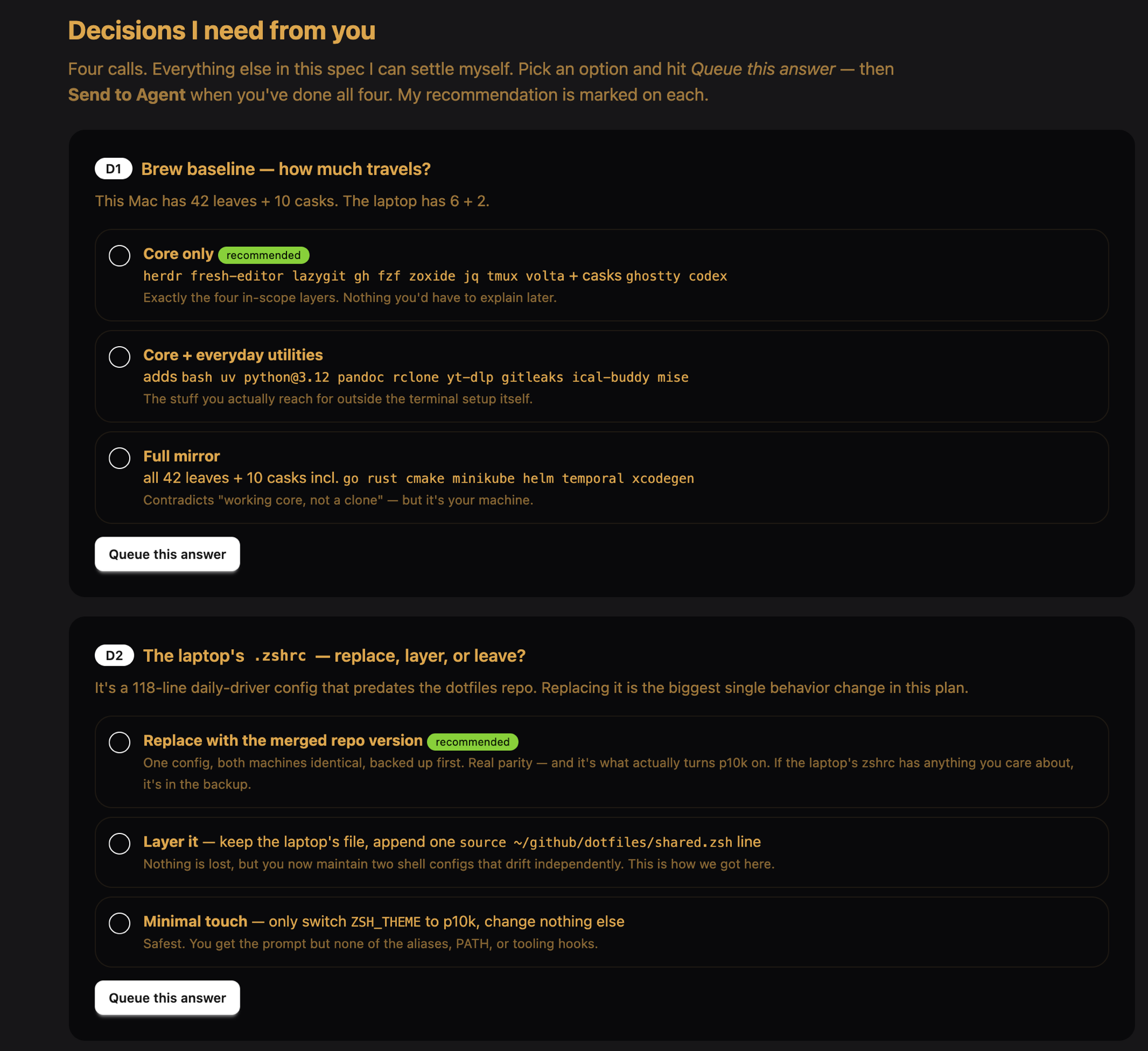
Those structured decisions are worth the extra authoring time, though. Lavish ships playbooks that teach the agent common artifact shapes, and the one it calls input is my favorite: instead of a question buried in chat scroll, the agent lays out each call it needs from me as a set of clean options on the page, recommendation marked, with a queue button per question. Seeing “here are the four decisions I need from you, everything else I can settle myself” rendered as cards changes the feel of the review entirely.
Then the page loaded, and the loop got good. Each candidate task was a card with a checkbox. I checked the keepers, typed short notes on the maybes, and hit send. My picks arrived in the agent’s context as structured JSON, not as prose it had to parse and hopefully not misread. I edited the underlying file mid-session and the page live-reloaded. There’s a conversation panel on the page, so the agent’s follow-up questions showed up next to the work instead of in another window. Two full rounds of that and the shortlist was done. It beat numbered-list-in-chat curation by enough that going back feels broken. I’ll do whatever it takes to not have to.
Lavish runs an automated layout audit in the real browser, a checker that measures element geometry and reports genuine breakage back to the agent so it gets fixed without bugging you. In one session, mine kept crying wolf: “overlapping text” errors with 0px of overflow, a different card each time, disproven every time by an actual screenshot. The page rendered fine the whole time; the checker was seeing things. Others have hit the same thing (#143, #186). It happened in that one session and hasn’t come back since.
When the wait pays for itself
The wait amortizes. That’s the whole economics of this tool.
One review surface that absorbs multiple rounds of feedback is worth a couple of minutes of build time. My curation session was two rounds on one page. A plan review before a big implementation might be four or five. Spread the build cost across those rounds and it disappears. But if you just need an answer to a question, a paragraph in chat was always the right tool, and asking for an artifact turns a ten-second answer into a three-minute ceremony. I don’t want to oversell this: Lavish is for work you’re going to iterate on, not for everything.
Two conditions of use, since I’d want someone to tell me. The first is small: the standard install path runs unaudited code via npx -y. I read the skill file and installed it manually instead, which took ten minutes and let me sleep fine.
The second deserves a real look. Lavish has a share command, and it’s a genuinely useful idea: one command publishes your artifact to ht-ml.app, a third-party hosting service, and hands back a URL you can send to a teammate or reference from anywhere. Before you use it, go read what publishing there means. Everything is public by default and crawlable, the robots.txt welcomes AI crawlers, there’s no documented delete endpoint (the terms say they “may add to, alter, relocate, or remove any data at any time, for any reason, without notice”), and published data may be used for product development, “including commercial offerings.” For a demo that was born public, fine. For anything client-flavored or personal, keep it local. I liked the feature but felt uncomfortable enough with those terms that I built my own place to post Lavish artifacts, one I control. I don’t think everyone needs to do that, but it’s an option, and if you want your own, I have a prompt your agent can take and build it for you. Message me on LinkedIn or find me on X.
Where this leaves me
The review loop is the thing. Not the pretty HTML, the loop: point at the exact element, say the thing, and have it land in the agent’s context as structure instead of prose. After a week-plus of that, screenshot-and-paragraph feedback feels like the workaround it always was.
It works when the artifact will absorb multiple review rounds, and it breaks even or loses on one-shot questions. The cost is a couple of minutes of authoring wait per artifact, plus the odd false alarm from a young tool. For plan reviews and curation passes, I’m paying it happily. We’ll see if it holds up as the artifacts get bigger.