
Perplexity open-sourced Bumblebee last week. It’s a read-only scanner looking for any suspect extensions, packages or AI tool configurations. It’s what Perplexity runs on their developer machines and they wanted to give back by sharing it with the engineering community. When a supply-chain attack hits the news and a package or extension you might have installed gets named, Bumblebee answers one specific question fast: is the compromised version sitting in your lockfiles right now? I ran it on my laptop the night I came across it. Notes from the install and the first few scans below.
Perplexity is best known for their AI answer engine. They’ve since expanded into a browser (Comet) and an agent platform (Computer). Bumblebee’s threat catalogues are themselves built using Perplexity Computer, per the project README. Eat your own dog food!
What it does
Bumblebee walks a file tree from wherever you point it. It opens lockfiles, package-manager install metadata, editor extension manifests, browser extension manifests, and MCP host configs. It does not read source code, run any package manager, or execute lifecycle scripts (npm’s postinstall and friends). The whole design is that you can scan for compromised packages without accidentally triggering them.
From those metadata files it extracts (ecosystem, name, version) tuples and matches them against catalogues of known supply-chain campaigns. Perplexity ships eight catalogues in the repo today. They cover node-ipc, nx-console-vscode, laravel-lang, gemstuffer, shopsprint, and trapdoor, plus two shai-hulud variants (the mini and AntV waves). New ones land as pull requests when a campaign breaks.
Install
It’s a single 3 MB binary with no dependencies. The release page has prebuilt darwin-arm64, darwin-amd64, and Linux binaries. I dropped it in a throwaway directory:
curl -L -o bb.tar.gz \
  https://github.com/perplexityai/bumblebee/releases/download/v0.1.1/bumblebee_0.1.1_darwin_arm64.tar.gz
tar -xzf bb.tar.gz
./bumblebee selftest
Selftest runs against embedded fake-package fixtures and exits non-zero if the install is broken. Useful as a fleet rollout smoke test.
The tarball also drops six catalogues into ./threat_intel/.
First scans
Two scans worth running. The baseline gives you a global inventory of what’s on the machine; the deep gets you the exposure check against the catalogues.
./bumblebee scan --profile baseline > baseline.ndjson
./bumblebee scan --profile deep --root "$HOME" \
  --exposure-catalog ./threat_intel \
  --findings-only --max-duration 10m
On my laptop:
- Baseline: 4 seconds, 7,198 package records across six ecosystems (npm, go, mcp, browser-extension, editor-extension, pypi).
- Deep against
$HOME: 52 seconds, 3 million files walked, 128 thousand packages parsed, zero findings.
Zero findings is reassuring but worth being precise about. It means none of the exact compromised tuples in those eight catalogues are sitting on my machine. It is not a vulnerability scanner, an antivirus, or a general security audit. The catalogue covers eight named incidents. Anything else is invisible.
To show what a hit looks like without pretending I had one, I faked a tiny node_modules/node-ipc/package.json with version: "12.0.1" and pointed Bumblebee at it:
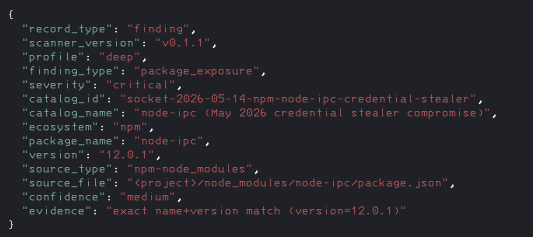
That output is NDJSON, one object per finding. The useful bits are the catalogue name, the package tuple, the file Bumblebee matched, and the evidence line with exact name and version match.
Things worth knowing
Three details from running it that the README skips past.
The inventory is more interesting than the findings
A scan returning zero is the boring outcome by design. The interesting data is what the scanner emits along the way. I went through the MCP slice of my baseline scan: sixty-three unique servers configured on my machine, most of which I didn’t install. Claude.ai’s Cowork session bundles a role-organized plugin marketplace (engineering, sales, marketing, design, bio-research, legal, finance, productivity) and that single marketplace accounts for around fifty of the sixty-three. Claude Code plugins add more. Codex plugins add more. GitLens ships an MCP server too, in both my Cursor and VS Code copies.
These are catalog entries, not active configurations. A .mcp.json inside a marketplace plugin directory says “this server is available to enable,” not “this server is currently running.” So the practical attack surface is smaller than sixty-three. But the inventory itself is the signal. Most security tools don’t even let you ask “how many MCP servers could be invoked on this machine if I clicked the wrong thing.”
The diagnostics double as configuration hygiene
Bumblebee emitted a warning on ~/.gemini/antigravity/mcp_config.json: malformed JSON. Turned out the file is empty, dated November 2025, and got converted into a symlink during a recent Antigravity update without anything ever getting written to the target. Harmless if you don’t use MCP in Antigravity. I wouldn’t have noticed otherwise.
Catalogue freshness needs a runner
The scanner is one-shot. Cadence is the runner’s problem: launchd, cron, MDM, whatever. For occasional spot-checks, just redownload the latest release tarball when you need to scan. You get the binary and a snapshot of catalogues in one move. For recurring scheduled scans where freshness matters in hours, clone the repo and run git pull && bumblebee scan in the runner. Two of the eight catalogues on my machine had to be pulled fresh from main because they landed after v0.1.1.
Whether it’s worth your time
Yes, if you spend more than a couple of minutes a quarter thinking about supply-chain risk on developer endpoints.
The install is a curl, a tar, and a selftest. There’s no excuse for not running it once.
The scan finishes in under a minute and tells you whether any of the named campaigns it knows about are sitting on your machine right now. If something fires, you have something specific to act on inside the time window where it matters.
The inventory output is useful even when nothing fires. If you’ve installed any AI coding tool with a plugin marketplace (Claude Code, Cursor, Windsurf, Antigravity, Codex), you have an MCP inventory worth looking at, and Bumblebee surfaces it cleanly without trying to be more than it is.
A clean scan tells you something concrete. None of the packages in your lockfiles match a known-compromised release, none of your editor or browser extensions are on the malicious list, and nothing has quietly rewritten your MCP configs. That’s measured against the eight campaigns catalogued today, and new ones land as they break. So the tool earns its keep when you keep it current and rescan, not when you run it once and forget it.